ThemePro - Widget & Wallpaper
- 4.7
- Rating
- 10.00M
- Installs
- Free
- Price

 Analysis by App-foxy
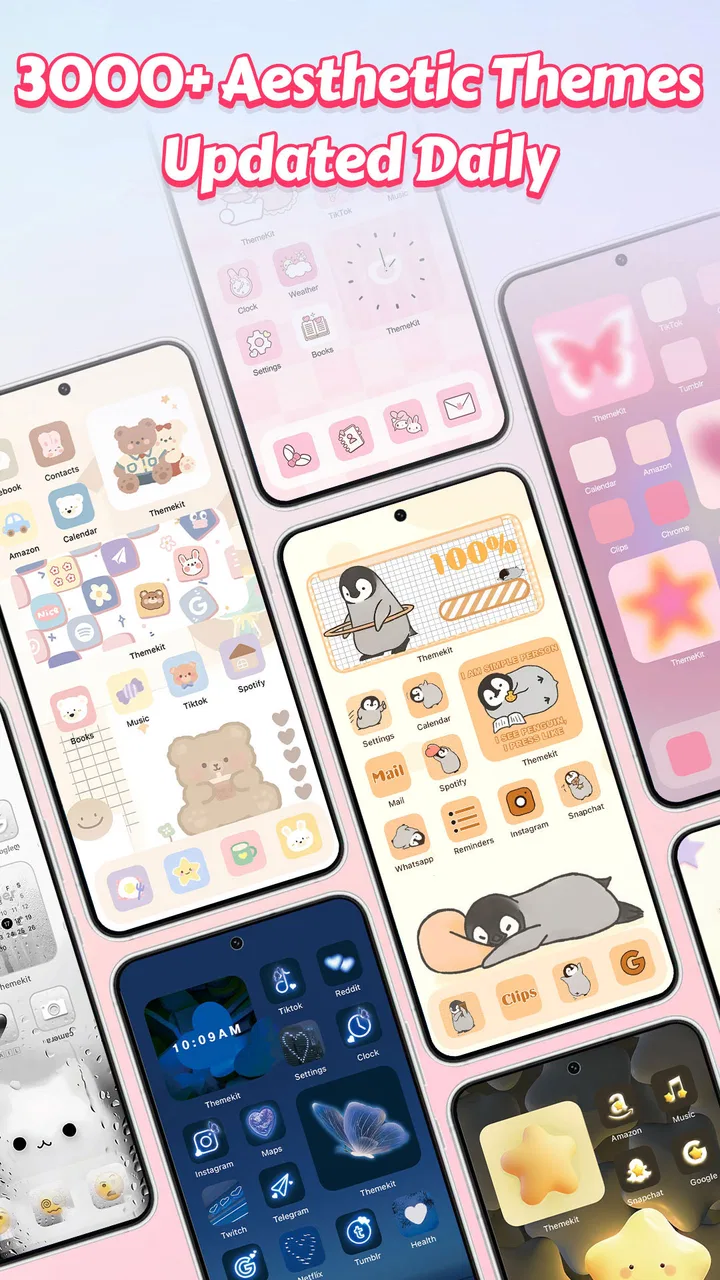
I tried ThemePro - Widget & Wallpaper as a way to make an Android phone feel more personal without assembling a look from several unrelated apps. My first impression was that it aims at people who want a coordinated screen rather than a single replacement wallpaper: anime-inspired themes, three-dimensional icon styles, aesthetic widgets, and wallpapers are brought together under one personalization app. That makes the first decision fairly simple. If you enjoy changing the visual mood of your phone and want the pieces to look like they belong together, this is worth exploring. If you prefer the cleanest possible home screen or dislike decorative interfaces, it may feel like too much.
The app is developed by ThemeKit and is available free of charge, although optional in-app purchases range from $0.99 to $34.99 per item. It is rated for Everyone, works with Android 6.0 and later, and the current version is 8.0. Its popularity is easy to understand: it has passed over 10 million installs and holds a 4.7 average from around 247 thousand ratings, alongside roughly 1.3 thousand written reviews. Those figures suggest that the basic appeal is broad, but they do not remove the need to decide whether its visual style matches your habits.
What to expect before choosing a theme
ThemePro is best understood as a visual customization toolkit, not as a replacement for the phone itself. The main attraction is the chance to work with a consistent appearance across the home screen. Instead of searching separately for a wallpaper, then trying to find icons that do not clash with it, I can begin with a theme direction and judge the entire arrangement as one design.
You May Also Like

 Blood Strike: 2.5 Anniversary
Blood Strike’s Loadouts Turn Every Drop Into a Tactical Gamble
A close look at Blood Strike’s custom loadouts: how fast access to signature weapons reshapes its battle royale rhythm, rewards preparation, and narrows the gap between fights.

 Pandora - Music & Podcasts
Pandora’s Music Is Easy to Start, but Harder to Recover
Pandora’s strength is its low-effort path from a seed to a station. Its weak spot is how much confidence it asks you to place in connection, setup, and quiet recovery.

 8 Ball Pool
 Is Built on Rivalries, Rematches, and Routine
A close look at the rivalries, rematches, shared routines, and unanswered safety questions that turn a quick pool match into a persistent mobile community.

 Samsung Music
’s Quiet Strength Is Playing What You Already Own
Its reach comes less from spectacle than from dependable access to a personal library. That simplicity is both the app’s strongest retention engine and its ceiling.

 AccuWeather: Weather Radar
AccuWeather Review: A Quick, Clear Forecast for Everyday Decisions
For everyday plans, the best forecast is the one you can understand quickly. AccuWeather makes rain timing, radar, and local conditions easy to act on, with a few trade-offs.

 Hill Climb Racing
Why Hill Climb Racing Still Turns Crashes Into One More Run
A tiny car, a bumpy hill and one more upgrade: Hill Climb Racing keeps resurfacing because its simple chaos makes every near-miss feel personal.
More From Our News Desk
View All News


The anime focus gives the app a clear personality. Some users will appreciate that immediately, especially if they want characters, illustrated scenes, or a more expressive home screen. Others may find the selection less suitable for a restrained work phone. The useful point is that the app does not pretend customization has to be neutral. It is made for people who want their device to show some taste and mood.
The wallpapers are the easiest place to start because they change the phone’s atmosphere without requiring much commitment. A wallpaper can make an otherwise ordinary home screen feel new in seconds. The more noticeable transformation comes from pairing it with matching icons and a widget. I found that this combination matters more than choosing the most dramatic individual image. A striking wallpaper with unrelated icons can look untidy, while a simpler background with coordinated elements often feels more polished.
The three-dimensional icon approach also has a trade-off. It can give familiar app shortcuts a stronger visual identity, but it may be less immediately readable than the standard icons supplied by the phone manufacturer. I would therefore avoid changing everything at once if you rely on muscle memory. Start with the home screen you use most, keep important apps in familiar positions, and give yourself time to decide whether the new shapes remain easy to recognize.
Widgets add another layer of personality, but they are not automatically useful just because they look attractive. I prefer to use one where it supports a real routine, such as checking information at a glance, rather than filling empty space. A decorative widget can improve balance, yet it also consumes room that could otherwise hold app shortcuts. The strongest layouts in ThemePro are the ones where appearance and daily convenience agree.
Setting up a first look without making the screen chaotic
For a first-time user, I recommend beginning with a small goal: create one pleasant home screen, not redesign every screen on the phone. Open the app, browse until you find a visual direction you genuinely like, and pause before applying several unrelated items. Think of the wallpaper as the foundation, the icons as the supporting color and shape system, and the widget as an accent. This simple order prevents the common mistake of collecting attractive pieces that do not work together.
Before applying anything, take a quick mental note of your current arrangement. Remembering where your most-used apps sit makes it easier to judge the theme itself instead of confusing a new layout with a loss of efficiency. I also suggest testing the look in normal lighting, not only while browsing inside the app. A wallpaper that appears subtle in a preview may dominate the screen once icons and text are placed over it.
ThemePro is free to install, which makes experimentation approachable. Still, the presence of optional purchases means I would not assume every appealing item belongs to the free selection. If an item asks for payment, decide whether it improves the whole layout or merely looks impressive in isolation. A paid element is easier to justify when it completes a style you already use regularly; it is harder to justify when you are still unsure whether you like the overall direction.
One practical habit helped me avoid wasting time: I treated each theme as a possible “set” and compared it against my actual phone habits. Does the background leave enough contrast for labels? Are the icon shapes easy to distinguish? Does the widget occupy space I can spare? These questions are more useful than asking whether a preview looks beautiful on its own. A phone is interacted with repeatedly, so usability should decide the final choice.
The first meaningful success is a coordinated home screen
The moment ThemePro starts to feel worthwhile is not when I scroll through a large collection. It is when the phone’s first screen becomes recognizable as one intentional design. For me, that means applying a wallpaper, adding a compatible icon treatment, and placing a widget only if it improves the arrangement. The result does not need to be elaborate. A restrained combination can be more comfortable than a screen packed with visual effects.
I would begin with the page that contains the apps I open most often. Keep those shortcuts visible and avoid moving them merely to imitate a preview. Then adjust the background around that practical layout. This workflow is more reliable than trying to recreate a showcase image exactly, because promotional arrangements are designed to look balanced while your own screen reflects real usage.
A useful second step is to compare the finished screen with the default setup at the same brightness. This reveals whether the customization improves the phone or simply makes it different. If text becomes harder to read, reduce the visual competition by choosing a calmer wallpaper or removing a decorative element. If icons blend into the background, change the arrangement rather than forcing yourself to memorize an uncomfortable design.
For an everyday example, imagine someone who uses a phone for messaging, music, maps, and a few work apps but feels bored with the standard home screen. I would suggest choosing a wallpaper with a clear area behind the main shortcuts, applying a related icon style, and using one widget near the top instead of scattering several across the page. The phone would feel refreshed while the important actions remained close to hand. That is a more realistic success than building a complex layout that looks good only during setup.
There is also a good reason to save your favorite visual idea mentally before changing it again. Personalization apps encourage browsing because every new option can look tempting. I found it more satisfying to live with one arrangement for a while and notice what actually bothers me. Maybe the wallpaper is too bright at night, the icons are too similar, or the widget is taking space from a frequently used shortcut. Those observations lead to better changes than endlessly switching themes.
Where first-time users may become confused
The biggest source of confusion is the difference between browsing a design and making the phone comfortable to use. A preview can show a beautiful composition, but your launcher, screen size, icon placement, and existing habits affect the result. I would not judge the app harshly if the first application does not look exactly like the preview. Instead, treat that first attempt as a starting point and adjust the components that interfere with reading or navigation.
Another point to keep in mind is that not every visual item has the same importance. The wallpaper changes the entire background, while icons affect recognition and widgets affect both layout and information density. If you dislike the result, change one layer at a time. Replacing everything together makes it difficult to know what caused the problem and can turn a quick customization into a frustrating reset.
Icon familiarity deserves special attention. Decorative icon sets can be attractive, but a stylized symbol may not communicate as quickly as the original app icon. I recommend keeping your most urgent apps in a consistent row or folder and using the more expressive treatment on less time-sensitive shortcuts first. This is a small compromise, but it preserves speed while still allowing the phone to look distinctive.
Widgets can create a similar problem. A widget that looks balanced in a theme preview may push other shortcuts below the fold on a smaller display. If your home screen starts feeling crowded, remove the least useful widget before abandoning the entire theme. In my experience, one well-placed element usually contributes more than several competing ones. The app is most enjoyable when customization remains easy to reverse.
There is also a financial point that deserves a calm approach. Since ThemePro is free but includes optional purchases, I would browse first and purchase only after living with a style long enough to know it suits me. The available purchase range extends from $0.99 to $34.99 per item, so the difference between a small experiment and a more expensive choice is significant. I would be especially careful with impulse purchases made simply because a preview catches my eye. A theme is valuable when I still enjoy seeing it after the novelty fades.
Compatibility is another reason to set expectations sensibly. The app supports Android 6.0 and newer, which covers a wide range of devices, but phones can differ in how their home screens handle customization. If an arrangement feels slightly different from the preview, I would first check the practical result on the device rather than assuming the design has failed. The important test is whether the home screen remains readable, responsive, and convenient for the way you use it.
How it compares with simpler alternatives
The usual alternative is to choose a wallpaper from the phone’s own settings and stop there. That approach is faster and often better for someone who wants minimal change. It also avoids the visual decisions that come with matching icons and widgets. ThemePro becomes more appealing when a wallpaper alone feels incomplete and you want a unified look without searching through separate customization tools.
Another alternative is to collect individual wallpapers, icon packs, and widgets from different sources. This can offer more control, particularly for experienced users who enjoy fine-tuning every detail. The downside is the time spent checking whether colors, shapes, and proportions work together. ThemePro’s advantage is convenience and a stronger sense of a ready-made visual direction. Its limitation is that a curated style may not give a perfectionist the same level of control as building a layout piece by piece.
Compared with leaving the manufacturer’s default design untouched, this app is more expressive but also asks more from the user. Default icons are usually familiar and predictable. A themed screen can be more enjoyable, yet it may require a short adjustment period. I would choose ThemePro for a personal device where appearance matters, and I would be more cautious on a phone used primarily for fast work, accessibility, or strict visual consistency.
The app is also not the right choice for someone who wants a completely bare home screen. Its appeal comes from visual change, so a user who dislikes anime artwork, decorative widgets, or stylized icons may gain little from installing it. In that case, a simple wallpaper tool or the phone’s built-in personalization settings would probably be less distracting and more efficient.
Small workflow improvements that make the experience better
My first useful tip is to design around contrast before color. A wallpaper can match an icon set beautifully and still make labels difficult to read. Look for enough visual separation behind shortcuts, especially if you use the phone outdoors or in bright rooms. If the design is attractive but tiring to scan, it is not a successful customization.
My second tip is to reserve the most decorative treatment for the screen you actually enjoy looking at, not necessarily the screen with the most shortcuts. If your main page is crowded, place a theme-inspired arrangement on a secondary page and keep the first page practical. This lets you enjoy the artwork without sacrificing quick access to everyday apps.
A third insight is to use ThemePro as a seasonal or mood-based refresh rather than a permanent commitment. Because the app is built around visual themes, it makes sense to change the atmosphere when your preferences change. But frequent switching can become a distraction and may make the phone feel inconsistent. I would keep one dependable setup and experiment only when I have a clear reason, such as wanting a calmer background or a more energetic look.
A fourth useful check is to judge the widget by the number of times it saves a separate tap. If it only fills space, it is decoration; if it gives you information you regularly seek, it earns its place. This distinction helps prevent the common personalization trap of sacrificing convenience for appearance.
Who will enjoy it, and who should skip it
I would recommend ThemePro to someone who wants an anime-led visual identity, enjoys changing wallpapers, and likes the idea of coordinating icons and widgets in one place. It is also a good fit for a first-time customizer who would rather begin with a complete visual direction than learn how to assemble every component independently. The free entry point makes it easy to test the basic experience before deciding whether optional items are worth considering.
I would be less likely to recommend it to a person who values maximum simplicity, depends on instantly recognizable default icons, or wants a highly controlled design system with no decorative elements. Users who need a work phone to remain visually quiet may find the app’s strengths distracting. Likewise, anyone uncomfortable with optional purchases should browse carefully and avoid treating every attractive preview as something they need.
After using it, I see ThemePro - Widget & Wallpaper as a friendly starting point for expressive Android personalization. Its best result comes from restraint: choose a wallpaper that supports readability, add icons that remain recognizable, and use a widget only when it helps your routine. The strongest setup is not the busiest one; it is the one that makes your phone feel personal without slowing you down. With that approach, the app offers a clear path from a plain default screen to a coordinated look, while still leaving room to decide whether its more decorative style belongs in your everyday setup.
FAQs for ThemePro - Widget & Wallpaper
01What customization options does ThemePro offer?
ThemePro provides a wide variety of customization options, including an extensive selection of widgets and wallpapers. Users can personalize their home screens with different themes, colors, and styles to match their preferences. The app regularly updates its library, ensuring fresh content and designs for a unique user experience.
02Is ThemePro compatible with all Android and iOS devices?
ThemePro is designed to work seamlessly on most modern Android and iOS devices. However, some older devices may experience limited functionality or performance issues. It's recommended to check the app's compatibility with your specific device model before downloading to ensure optimal performance.
03Does ThemePro require a subscription or offer in-app purchases?
ThemePro offers both free and premium content. While the app is free to download, some themes and features may require in-app purchases or a subscription to access. The premium version unlocks exclusive designs and tools, providing a more comprehensive customization experience for users.
04How user-friendly is ThemePro for beginners?
ThemePro is designed with user-friendliness in mind, featuring an intuitive interface that is easy for beginners to navigate. The app provides clear instructions and a straightforward setup process, making it accessible for users with varying levels of tech-savviness. Tutorials are also available to guide users through customization options.
05Can I create and upload my own themes and widgets in ThemePro?
Currently, ThemePro does not support the creation or upload of user-generated themes and widgets. The app focuses on providing a curated selection of high-quality designs developed by professional designers. However, developers may consider user feedback and potential feature updates in future versions.
Pros
- Highly customizable widgets
- Vast collection of wallpapers
- User-friendly interface
- Regular updates with new themes
- Seamless integration with devices
Cons
- Ad-supported free version
- Some features require in-app purchases
- Occasional loading delays
- Limited free wallpaper options
- Requires frequent permission updates

ThemePro - Widget & Wallpaper
Gallery